
Login Arris Cable modem router First time Activation
Arris surfboard cable modem router use for Xfinity internet connections. Arris modem routers come with many models such as a modem for Xfinity subscriber, Cable modem, and WiFi cable modems. Steps to login Arris modem for all models almost the same. You need to access modem settings to update WiFi name, Password, Login password form cable modem as well as other configurations.
However, this post will describe to you an easy method to login arris Wi-Fi cable modem from computer to port forward, changing the default Arris modem login IP address or other settings. The access settings page of Arris router needs to physically connect with Desktop or Laptop. Follow simple steps to login arris cable modem.
Arris Surfboard Cable Modem Connection
First-time connection and activation Xfinity internet connection with Arris T25 cable modem router need to proper physical cable connections.
Arris T25 router having 1 cable connector for internet coaxial cable connection 2 Ethernet port for Desktop /Printer wired connection 2 RJ11 port for Telephone connections and 1 Power socket to power on the device.
1: Coaxial Cable connection: connect internet cable coming from Internet providers to cable ports.
2: Phone Connection: connect Phone to Rj11 ports for voice calls.
3: Ethernet Connection: connect computer/Laptop/NVR or any other network device to Ethernet ports.
3: Power Connections: Power on Arris router with DC adapter comes with a box.
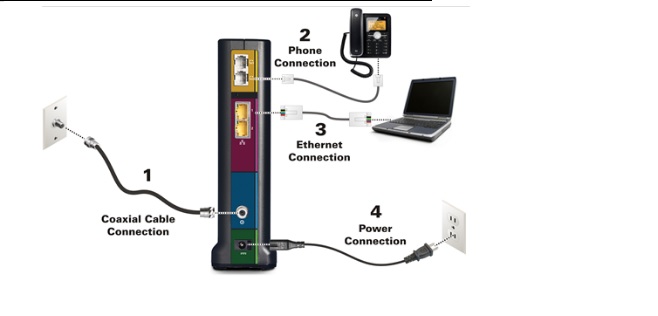
After the physical connection of the Arris modem router now proceed to the configuration part.
How to Login Arris Cable modem 192.168.100.1
The default login settings for arris router can get from the user manual comes with the router or backside sticker of the device.
Arris Default Login IP Address: 192.168.l00.1 or 192.168.0.1 or 192.168.1.1
The default username for Arris WiFi cable modem is “admin”
And default Password again “admin”
For some models Default, the password is “password”.
Use the above settings to login arris router web interface from a computer or laptop.
Open Web browsers such as Google Chrome, Internet Explorer or Firefox and access http://192.168.100.1 or http://192.168.0.1
Use Arris Default Router Login and Password for first-time setup modem.
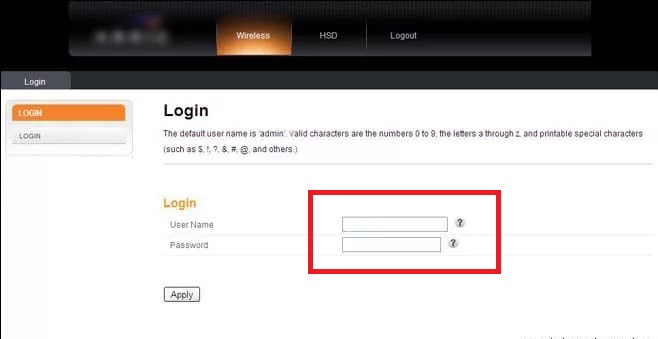
Input username and password to login arris Xfinity cable mode and press the Apply button.
Manage Arris Wireless Network
Once you have a login router now you can set up and manage wifi name as well as password to update default WiFi passwords.
Click the Wireless tab from the top menu.
Wireless- Basic Setup
1: Basic Setup
Host Name: ARRISGW (give the name for arris router to identify)
Enable Wireless: Checkbox to enable
Wireless Network Name (SSID): ARRIS-FF52 (change the Wifi name here)
Change Arris Login Password: Click the Change password button and set new login password.
Security Mode: WPA2-PSK
2: Security Settings
Encryption Algorithm: AES
Pre-shared Key: Arris-wifi password (set password for Arris WiFi cable mode)
3: Enable WPS in Arris Cable mode
Using this option you can enable or disable the WPS option for your Arris T25 cable modem router.
Set WPS pin
Connect Arris WiFi cable modem without WiFi password using the WPS bin or WPS button available in Router.
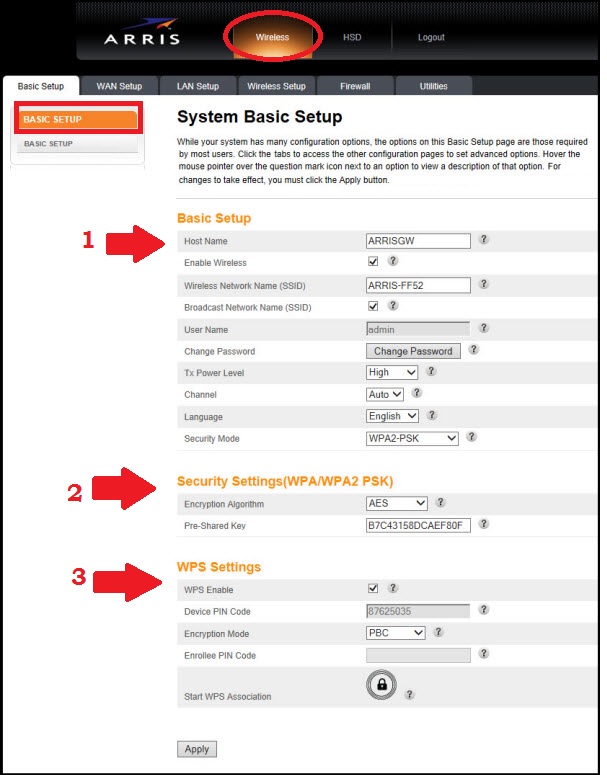
After all, configuration Press the Apply button to save settings.
These is the simple steps to login Xfinity Arris cable modem to change the wireless password and login password change.
If you are unable to access arris router than you may read Question and answer to fix the issue.
Q: Arris T25 Cable Modem Login IP Not Working?
Ans: IF you getting error Arris router IP Not responding or Arris Default Login IP 192.168.l.100.1 not working then it can be due to IP address changed or PC/Laptop not in same series IP address.
Solution: Go to PC/Laptop LAN Properties and make sure there is no different series IP address configured. Make it Auto obtain the IP address.
And check again to access the default IP address. IF still not working
Make Arris router factory reset using the reset button.
Q: How to Factory reset Arris Modem Router?
Arris router can factory reset using two methods. 1 Soft reset and 2 Hard resets.
To make software reset need to access the web interface of arris router but if unable to access the login page try the reset button. Only use factory reset using reset button if can t login to arris modem.
- Find the small tiny reset button in Arris T25 modem.
- Use the needle to press the reset button.
- Press and hold the reset button for 10 Seconds and release button once router rebooting.
- Now router settings restored to factory mode.
- Access default Login IP Address and use username and password to open the settings page.
I hope this User manual for “How to Log in to an Arris Router” will help you to change the WiFi password and other configuration parameters to keep secure your home internet connections.
Related Post
- The Best Free WiFi Captive Portal Login Page
- How to test Wireless Point to Point speed without internet
- Netgear Nighthawk ac1900 router setup first time
- How to Login Asus router Settings 192.168.1.1